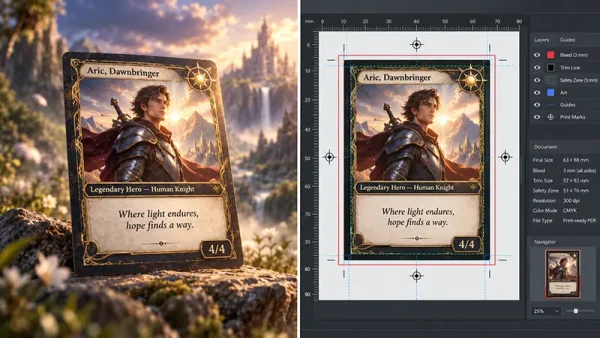
Author’s Note by Wensong Li, Prepress Design Director: In my nine years of print and packaging design, I have guided thousands of traditional projects to the press. But over the last couple of years, a massive shift has occurred: my desk is now flooded with stunning AI-generated concepts. Unfortunately, I also see the heartbreak when creators realize their glowing digital files print dark, muddy, or misaligned. My job is to bridge the gap between your on-screen imagination and physical manufacturing realities. I wrote this guide to help you translate your new AI workflows into a flawless physical deck. Here is what you need to know before you send your files to the press.
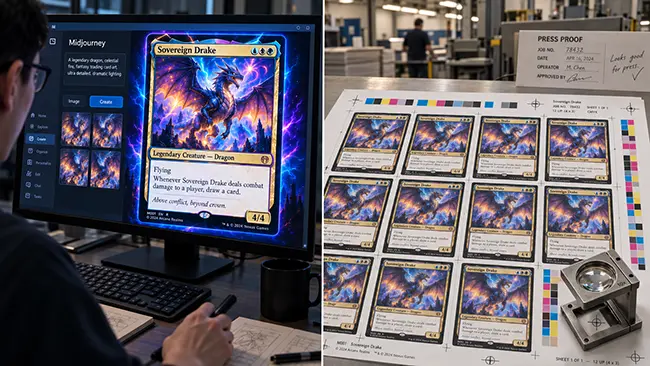
Generative AI has fundamentally reshaped the speed of game design and commercial card prototyping. What once required multi-month concept art cycles can now be iterated in days. Yet, across commercial game publishing and crowdfunding fulfillment, manufacturing facilities witness a persistent failure rate when these visual concepts reach the factory floor.
The issue is rarely the artistic imagination; it is the physical gap between RGB-driven pixel arrays and the mechanical realities of industrial offset lithography. AI tools can create stunning artwork, but a single image that looks finished on a glowing screen is not a production-approved file for AI card printing.
This prepress guide bridges the gap between digital generation and physical manufacturing. Below is a structured overview of how to transform raw AI-generated concepts into tournament-ready, commercial-grade playing cards.
Quick Start: The Creator’s 30-Second Guide
Not a prepress engineer? No problem. If you are a game designer or creator looking to print your first AI-assisted deck, just remember these three golden rules:
- Never use AI for text or icons. AI text will print blurry. Always add your text and game symbols later in a program like Adobe Illustrator or InDesign.
- Screens glow, paper doesn’t. Your dark, moody AI art will print much darker on physical paper. You will need to adjust the brightness and color profile before printing.
- Leave room for the blade. Always generate your art slightly larger than the final card size (this is called “bleed”) because industrial cutting machines need a small margin of error.
Feeling overwhelmed by the technical details below? Download our Free Industrial Card Templates to get the exact dimensions, or jump straight to Section 7 and send us your files for a Free Prepress Engineering Audit. We will handle the math.
1. What Your AI Tool Produces vs. What the Printer Needs
AI tools are incredibly useful at the concept stage, but a card deck is a controlled manufacturing project. For offset printing for TCG (Trading Card Games) and board games, that means artwork, layout, file structure, color, finishing instructions, and approval records all matter.
For card printing, it is critical to separate the work into three distinct levels:
- Artwork assets: The raw illustrations, backgrounds, or character art generated by AI.
- Card layouts: Complete card faces or backs built at the correct size in professional software, with proper text, borders, trim, and bleed.
- Production files: The final files prepared according to the manufacturer’s delivery requirements, calibrated for ink and printing plates.
Evaluating Multi-Engine Outputs
Different AI tools generate artwork in different ways, and each introduces specific microscopic artifacts that are aggressively magnified by physical offset printing plates.
| Generative Engine | Common Print Risks | Prepress Solutions |
|---|---|---|
| Midjourney | Deposits excessive Magenta and Yellow droplets into cool, dark shadows, causing muddy prints. | Apply selective Despeckle and neutralize rogue color channels in the dark spectrum. |
| GPT Image 2 | Tonal stepping (banding) across broad gradients like skies or glowing magic effects. | Convert to 16-bit channel depth and inject 1.0% to 1.5% monochromatic Gaussian noise to smooth the gradient. |
| Stable Diffusion | Dynamic range clipping (specular highlights push to 0% ink, causing harsh dropouts on paper). | Apply a curve adjustment to compress the 100% white ceiling down to a printable 3% minimum dot threshold. |
| Nano Banana 2 | High-frequency micro-noise along edge intersections due to tile-based processing. | Route shadow channels through an edge-preserving bilateral denoiser before rasterization. |
2. Resolution, Pixel Density, and Asset Inspection
Before investing time in a full deck layout, inspect the AI artwork itself. Commercial printing requires an absolute standard of 300 to 350 DPI at final physical print dimensions.
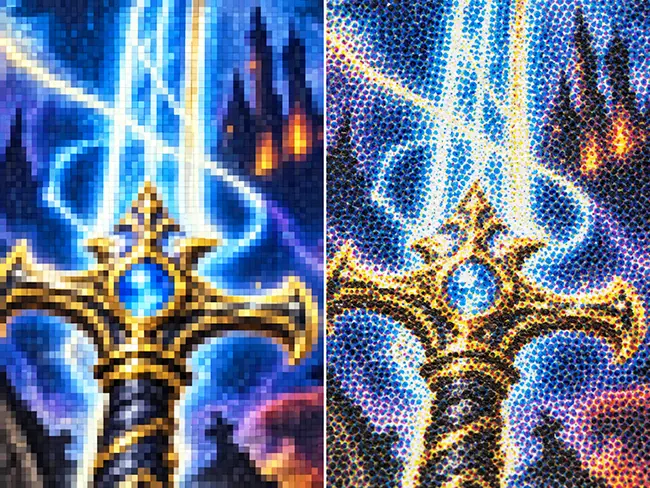
A standard poker card (63×88 mm) with a standard manufacturing bleed (69×94 mm) requires an absolute minimum raw canvas of 815×1110 pixels at 300 DPI, scaling to 951×1295 pixels at 350 DPI.
Check your artwork at two viewing scales:
- Actual printed card size: Helps judge overall composition and readability.
- Local magnification: This is where false detail, distorted hands, broken ornaments, or generated pseudo-text often becomes visible.
Note: Changing the DPI tag in a file does not create real detail. AI upscaling can increase pixel count, but it may invent texture or sharpen artifacts. Always inspect critical areas again after upscaling.
3. The CMYK Gamut Shift, Dot Gain & Dark Value Preservation
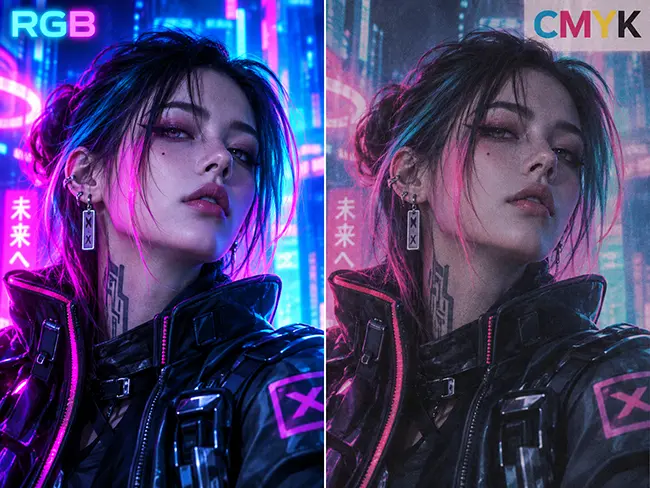
RGB screens emit light with infinite vibrancy; CMYK printing uses physical pigments with a limited chemical absorption spectrum. When an RGB file is arbitrarily dumped into CMYK via generic consumer software, an unmanaged color crush occurs.
Managing “Dot Gain” (Why Your Cards Print Too Dark)
During offset printing, liquid ink absorbs into paper fibers and spreads slightly—a mechanical phenomenon known as Dot Gain. Because AI art often heavily relies on deep, moody shadows, dot gain will turn those subtle dark details into a solid, muddy black mass. Prepress Fix: Always lighten your midtones and shadows by 10% to 15% via a Curves adjustment before converting to CMYK to compensate for this physical ink spread.
The Science of “Rich Black” vs. “Dead Ink”
Many dark-themed fantasy games generated by AI feature deep midnight tones. Here is how to engineer black areas so they print beautifully without turning into mud or smearing on the press:
| Ink Mix Strategy | Color Breakdown | Physical Result on Press |
|---|---|---|
| Standard Black | C0/M0/Y0/K100 | Failure. Appears washed-out, chalky dark gray. Paper fibers show through. |
| Over-Saturated Black | C85/M75/Y70/K95 | Failure. Paper over-saturation. Ink smearing, drying failure, and sheet-to-sheet transfer. |
| Engineered Rich Black | C60/M40/Y40/K100 | Target Standard. Deep, neutral velvet black. Full fiber masking with safe drying performance. |
Physical Emulation of the “Digital Screen Glow”
When standard CMYK pigments cannot physically recreate the glowing essence of an AI energy blast, physical finishing solutions are required. A gold-looking AI image is not hot foil stamping. To achieve real effects, you must supply separate mask files for Inline Cold Foil Spotting (printing CMYK over a reflective silver substrate) or Spot High-Gloss UV Lacquering.
4. The Three-Layer Card Architecture & Typography
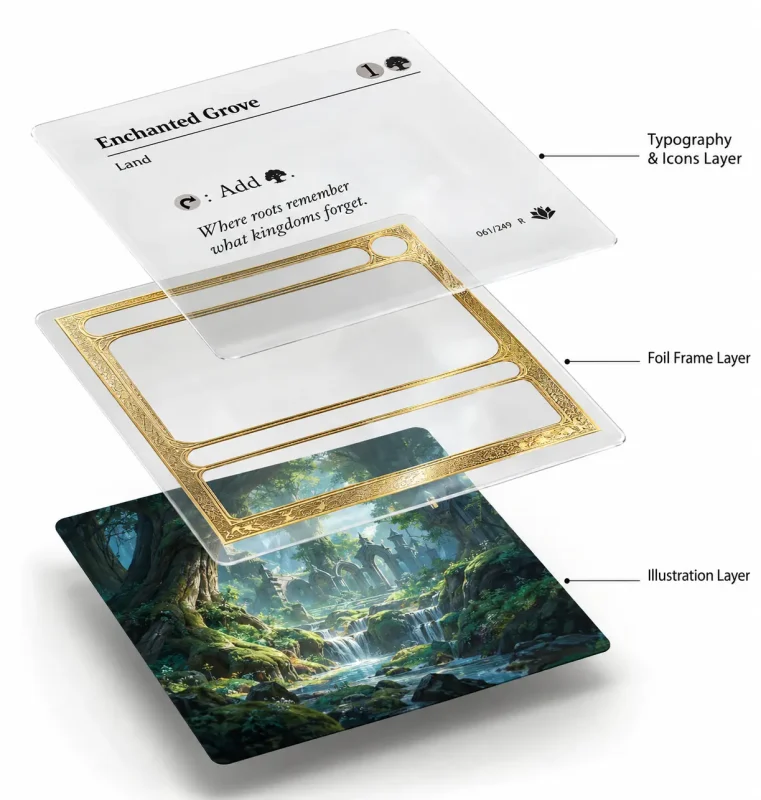
A golden rule governs the industrial manufacturing of card decks: Never allow a generative AI engine to render final typography, card frames, or iconography directly into the raster file.
When printed, rasterized text splits into loose four-color halftone rosettes, causing fuzzy edges. Every card must be assembled within an industry-standard layout program utilizing a strict Three-Layer Architecture:
- Layer 1: The AI Illustration Base (Raster) The fully post-processed AI background, stripped of all game rules and text, scaled to –, and converted to the target CMYK profile.
- Layer 2: The Vector Mechanical UI (Mid-Layer) All card margins, cost spheres, and text background windows constructed strictly with vector paths. This guarantees hairline stroke precision for die-cutting alignment.
- Layer 3: The Live Vector Typography (Top Layer) All rules text, titles, and numerical pips. Crucial Rule: All standard black instructional text must be mapped strictly to pure black (C0/M0/Y0/K100) and set to Overprint. This eliminates registration vulnerability, guaranteeing razor-sharp readability.
5. Physical Precision: Symmetry and Die-Cutting Tolerances
Cards are cut after printing. Steel cutting blades flex microscopically under the pressure of dense laminated core stock. Factories enforce an immutable mechanical tolerance of ±0.5 mm.
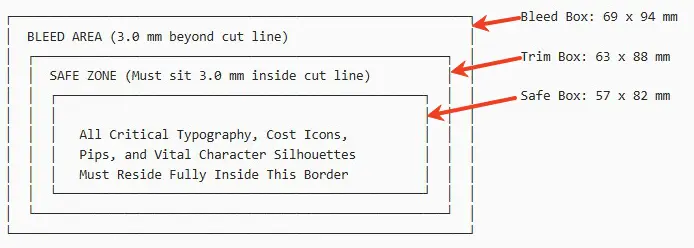
- Bleed (+3.0 mm minimum): AI background art must extend beyond the cut line.
- Safe Zone (−3.0 mm minimum): All vector typography and vital UI must stay well inside the cut line to survive mechanical shifting.
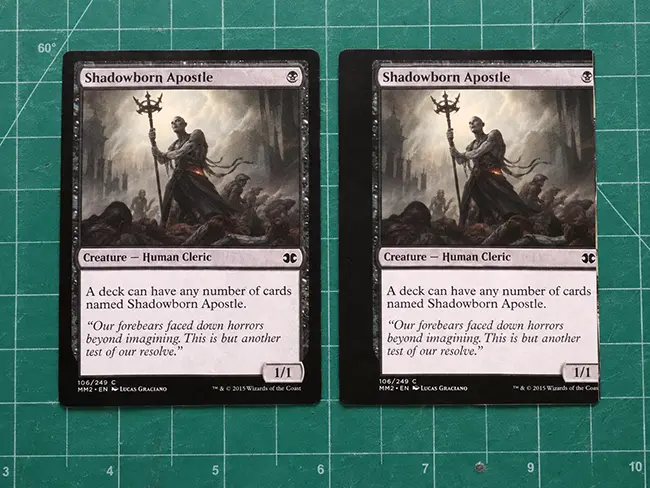
The Card Back Symmetry Protocol: In competitive card play, an asymmetrical card back disqualifies the deck. AI platforms struggle with absolute rotational symmetry. To fix this: take the top-left quadrant (25%) of your AI card back. Mirror it horizontally, then mirror that half vertically. Finally, rotate the design precisely 180∘ on an independent layer at 50% opacity. If any pixel fails to align perfectly, adjust it until absolute mathematical parity is achieved.
6. Category-Specific Substrates & Finishing Matrix
High-fidelity image prepress is meaningless if mapped onto the wrong physical core substrate. Card resilience, internal opacity, and the masking of surface artifacts depend on material selection.
| Commercial Category | Recommended Substrate | Protective Coating & AI Asset Synergy |
|---|---|---|
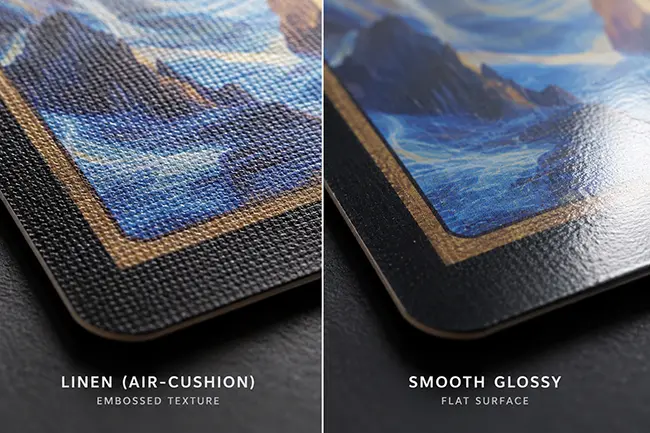
| Custom & Magician Decks | 310–330 gsm German Black Core | Air-Cushion (Linen) embossed finish. The micro-dimple structure naturally scatters light, masking minor high-frequency shadow noise from AI generators. |
| TCG & Competitive Games | 300–310 gsm Blue Core | Smooth polymer varnish. Demands maximum vector line fidelity (Layer 2) to prevent bleeding into high-contrast game art. |
| Luxury Collectible Cards | 35pt–55pt Laminated Board | Soft-Touch Matte + Spot Cold Foil. Perfect for routing Stable Diffusion’s high-contrast metallic highlights into physical foil masks. |
7. Preflight, Proofing, and Factory Handoff
Clear responsibility prevents confusion. The buyer or designer is responsible for rules, translation, vector layout, and AI artifact correction. The manufacturer handles technical preflight (bleed, resolution, CMYK separation, total ink coverage).
Never sign off on an entire volume production based purely on digital PDFs. Request a Calibrated Digital Hard Proof to evaluate shadow falloff and color balance under standard 5000K illumination before plates are burned.
Industrial Pre-Flight Checklist
Before bundling files for press release, ensure your assets pass this factory audit:
- Canvas Target: Scaled to – at 1:1 physical dimensions.
- Total Area Coverage (TAC): Under (Rich Black targeted at C60/M40/Y40/K100).
- Dot Gain Compensation: Midtones and shadows lightened by –.
- Dynamic Range Threshold: Zero specular white dropouts; highlights compressed to ≥3% minimum dot.
- Layer Architecture: Clean AI bitmap base, Vector UI mid-layer, K Overprint typography top layer.
- Physical Alignment: bleed and safe zone compliance.
- Fair Play Symmetry: Card backs verified under a rotational overlay.
Next Steps: Let Us Handle the Math
Are you preparing to manufacture a commercial card run using AI assets? Avoid unexpected delays and costly reprints.
- Download our Free Industrial Card Templates to start your layout with perfect factory-standard dimensions.
- Submit your files for a Free Prepress Engineering Audit. Send representative samples (two card fronts and one card back) to our prepress team. We will check resolution density, out-of-gamut CMYK spikes, dot gain risks, rotational symmetry, and die-line mechanical clearances to ensure your digital vision becomes a tournament-ready physical reality. Contact our Prepress Team Here.