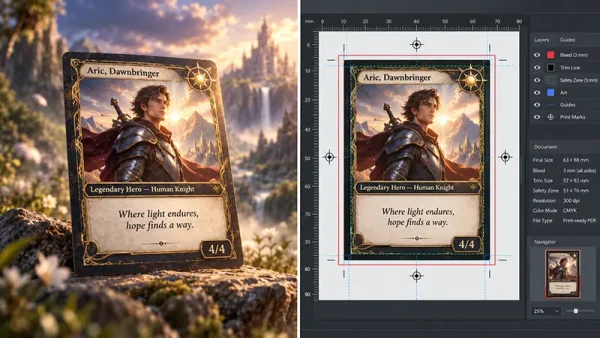
Creating a professional card game involves a blend of creativity, technical know-how, and meticulous planning. Whether you’re a seasoned designer or a beginner, knowing the right steps can make a significant difference in the final product.
This article provides ten practical tips to guide you through the process, from choosing the right design tool to finalizing your prints. By following these guidelines, you can ensure your card game not only looks great, but also meets industry standards for quality and durability.
10 Practical Tips For Making Professional Card Games
1. Decide Which Tool to Use for Your Design
The first step in creating a professional card game is to select the right design tool. Popular options include Adobe Photoshop, Illustrator, InDesign, and Canva. Your choice should be influenced by several factors, including your design skills, the complexity of your project, and the time and budget you have available.
For instance, Adobe Photoshop is a go-to for professionals due to its advanced features, but it requires a steep learning curve and is not free. On the other hand, Canva is an excellent option for beginners, offering user-friendly tools and pre-made templates that can be easily customized. Regardless of your experience level, choosing the right platform can set the tone for your entire project.
2. Use a Specific Template as a Guide for Accuracy
Templates are invaluable tools for ensuring accuracy in your designs. Each product size from Acelion typically comes with downloadable print templates that you can use to set up your files. These templates provide guidelines that help you place essential elements within safe zones, ensuring they aren’t cut off during the trimming process. By overlaying a template on your design, you can see precisely where the prints will be trimmed, allowing you to adjust your layout accordingly.

3. Design in CMYK Color Mode
For most printed materials, CMYK color mode is the standard. If you create your designs in RGB mode, conversion during the printing process may lead to color discrepancies. To avoid this, it’s crucial to design your files in CMYK from the outset. This approach gives you a more accurate preview of how the final product will look, helping you achieve the desired color fidelity.

4. Refer to Other Card Games for Inspiration
When you’re struggling with creativity, looking at other card games can provide valuable inspiration. While it’s important not to copy another design outright, studying how other games convey themes and mechanics can spark new ideas. Analyzing different styles, color schemes, and layouts can help you refine your vision and bring fresh concepts to your project.
5. Ensure a High DPI for Quality Printing
In the world of digital design, a resolution of 72 DPI (dots per inch) may be sufficient. However, for print projects, a minimum of 300 DPI is essential to ensure clarity and sharpness. A higher DPI translates to better resolution, which is critical for detailed designs. Blurry or pixelated images on your screen will appear even worse in print, so always aim for the highest quality possible.

6. Maintain Consistency in Design Elements
Consistency is a cornerstone of professional design. This applies to elements such as size, color, and thickness. Inconsistencies can disrupt the visual harmony of your game, making it appear amateurish. A unified design helps create a cohesive and polished card game look, which enhances the overall user experience.
7. Outline All Fonts
Outlining fonts is a precautionary measure to prevent text issues during the printing process. When fonts are outlined, they are converted into vector graphics, eliminating the risk of missing text or incorrect font rendering. This step is particularly important when using complex design software like Adobe Illustrator, where layering and multiple font types can cause issues if not handled correctly.
8. Run a Test with a Proof or Sample
Investing in proofs or samples is a wise decision, especially for high-volume projects. A hard proof allows you to evaluate the layout, proportions, and colors of your design, making it easier to identify and correct any issues. Digital or offset samples can give you a comprehensive preview of the entire card game set, ensuring that the final product meets your expectations.
9. Choose Your Paper Type Wisely
The choice of paper can significantly impact the look and feel of your card game. Factors such as thickness, color, texture, and finish should align with your design’s intent. If you’re unsure which paper type to choose, request samples from Acelion. This will allow you to compare different options and select the one that best suits your project. A well-chosen paper type can enhance the visual appeal and durability of your cards.

10. Order Your Prints in Bulk
Ordering your prints in bulk is a cost-effective strategy, especially for long-term project. Bulk orders not only reduce the per-unit cost but also ensure that you have enough stock to meet demand. It’s always better to have a surplus than to run out and face the inconvenience of reordering.
Professional Card Game Summary
Creating a professional card game is a multifaceted process that requires careful planning and attention to detail. By following these ten practical tips, you can streamline your workflow and achieve a high-quality final product. From choosing the right design platform to selecting the perfect paper type, each step plays a crucial role in bringing your vision to life.
As a professional card game printer, Acelion is happy to help you take the time to refine each aspect of your design. With dedication and the right approach, you can create a card game that stands out and delivers a memorable experience for players.